Showing posts with label technology. Show all posts

Wednesday, July 20, 2016

3D Printed Arduino Robot Arm Launched on Kickstarter

This is a project that I have been a part of for a few weeks. It is a low cost robot arm primarily for STEM and hobby.

We have taken it to kickstarter in order to get the ball rolling.

This has a been a fun project, because, like a software, it moved incredibly quickly. We went through multiple designs in a matter of days. And we had basically the full product in a couple of weeks.

Support the project on Kickstarter so we can get a very versatile and low cost robot into the hands of kids everywhere.


Tuesday, June 7, 2016

3-D Printed Microservo Robot Arm

This a project that I took on to create a simple robot arm for kids camps and classrooms. This arm is controlled by an arduino and uses 3 microservos. While it currently does not have a gripper that will be added soon. I will also be completing the kinematic model so that I can implement a positional controller into the arm.

When fully completed I will release the designs and likely produce a few as kits.

In the demo below I was controlling the arm through a keyboard.


Saturday, April 2, 2016

Jerry Multipurpose Home Robot Demo

I've been working for several months on the Jerry Project. He is finally ready to demo. This is the first video. I plan to have Jerry ready for sale near the end of 2016. From now on it is going to be a software development issue. All the hardware works just as expected. Jerry will first be released as an educational and hobby platform and within a year he will be in homes.

 If you would like to see more or watch the progress visit:
www.slantrobotics.com
Twitter
Facebook
Youtube


Friday, March 4, 2016

Slant Robotics


I have formed a new branch of Slant Concepts...Slant Robotics. The "Jerry" Project is going to become an official product. Jerry is now being built in Nampa, Idaho with a projected reveal of a finished product at the end of April. Jerry is going to be the home robot that everyone has imagined.

Be sure to follow the project of Twitter or Facebook.


Thursday, December 10, 2015

Incurve Spherical Robot

For my senior design project I was the chief designer of the internal mechanisms of a spherical robot. Both actuated degrees of freedom have a full range of motion unlike any other spherical robot built. Additionally the team was able to design an original non-holonomic controller for the omni-directional system we were pursuing.

The photos below show the design progression that the system took. All the CAD seen is my own original work (Except for the shell in the final image). I apologize some concepts were abandoned before they could be completed.

Original Concept and Outline
Full Aluminum Truss-Like Structure
Hybrid Wood-Aluminum with Linear Actuator
Hybrid Material with Offset Planes of Rotation
Final Design Designed for Controller Simplification
Final Design of the Incurve Spherical Robot


Jerry

This is a project that I have been working on for some time. Jerry is my foray into personal robotics. He will begin as a telepresence robot and then develop into an AI robot home assistant. A quick conceptual design is shown in the rendering below.


Friday, March 20, 2015

SlantWatch

Another conceptual design. How I would make a smartwatch.

Smartwatches do not need to have large displays. In fact, the less obtrusive they are the better. So the SlantWatch has a thin profile.

Straps on smartwatches are also a waste of space. For something so dependent on battery more space needs to be made for the battery. So the Slant watch would house that battery in one half of the rigid cuff. The other half would hold excess electronics.

The entire piece is semi-solid. The flexible points would be near the top of the cuffs before the screen. This allows the watch to take some extra abuse while being put on.

The watch uses a flexible OLED display, with a solid glass capacitive touch screen. Though E-paper would also be an option.

The interface would be like a wheel on the wrist. As you scroll through apps you would eventually circle back around to the beginning. In order to change categories or menus one would side-swipe, basically "changing the wheel."

In a future version it would be great if the display could go all the way around the cuff, making it effectively seamless, no mater what angle your wrist is at.


Thursday, March 12, 2015

Wrist Multitool

Over spring break from school I decided to build a multitool that I could wear in a shop were it would always be quick and easy to grab and use for just about anything.

The Wrist Tool is an early version. I have adapters on it for screwdrivers and socket wrenches. The top also has an english hex set cut in it. And what tool would be complete without a bottle opener.

The entire thing is 3-D printed. In the future I'll add holders for the screwdriver set on the inside of the tool.


Tuesday, March 10, 2015

Useful Robots

I recently started a blog called 'Useful Robots.' In it I outline robots that can be purchased and used by anyone who wants one.

The reason I made 'Useful Robots" was because there was really no place online that gives the average consumer or businessman an insight into what automation solutions are available to them. So I give profiles, not on research or the next big thing, but on the robotic mowers, or factory assistants, or vacuums that are ready to use right out of the box. It isn't cluttered with what a nerd would love, just with what an average person needs to know to buy.

Tuesday, March 3, 2015

Tour PNADDER

Tour PNADDER (Path Navigating Autonomous Differentially-Driven Escort Robot) is a project that I was a part of, as half of my senior project. The name is pronounced 'tor-nader.'

Tour PNADDER is meant to be a robotic tour guide for the Embry-Riddle campus. Guests will eventually be able to select a destination and the robot will lead them there.

Since, I came in at the half-way point of this project,  I did not have input on the initial designs, mechanical or otherwise (i.e. the name). My job, therefore, has been to design and develop the vision system that the robot is to rely on to navigate.

The vision system consists of a single Logitech webcam plugged into a Linux computer. I have to develop code, using Python and Open CV, that will let the robot know where it is with respect to the edge of any sidewalk on campus. I have never done anything with vision systems prior to this project.

The white lines display what the program believes 
to be the edge of the sidewalk.
The green line is a set-point to be used for localization
Performed on an indoor calibration grid I made.

So far, I have been able to implement a draft program that is able to run several filters on the video (Canny, Hough ...) to determine exactly how far the robot is from the edge of the sidewalk. This info will then be fed into a trajectory generator that will tell the robot where it needs to go.

I am still working to finalize the code. It runs a little slowly and has my error checking still in it. I'll post it when I'm finished.

Friday, February 20, 2015

SlantBook and Phone

What would a cellphone and a laptop made by Slant look like? I decided to design and phone and a laptop the way that I want those devices to be. The result are digital mock-ups of the SlantPhone and SlantBook.

The SlantPhone


Who says the flip-phone is dead. Use it as a normal phone or watch videos without crouching over the display (and what video is rectangular anyway, a square display still give you all the size you need). Also scroll and control one display with the other.
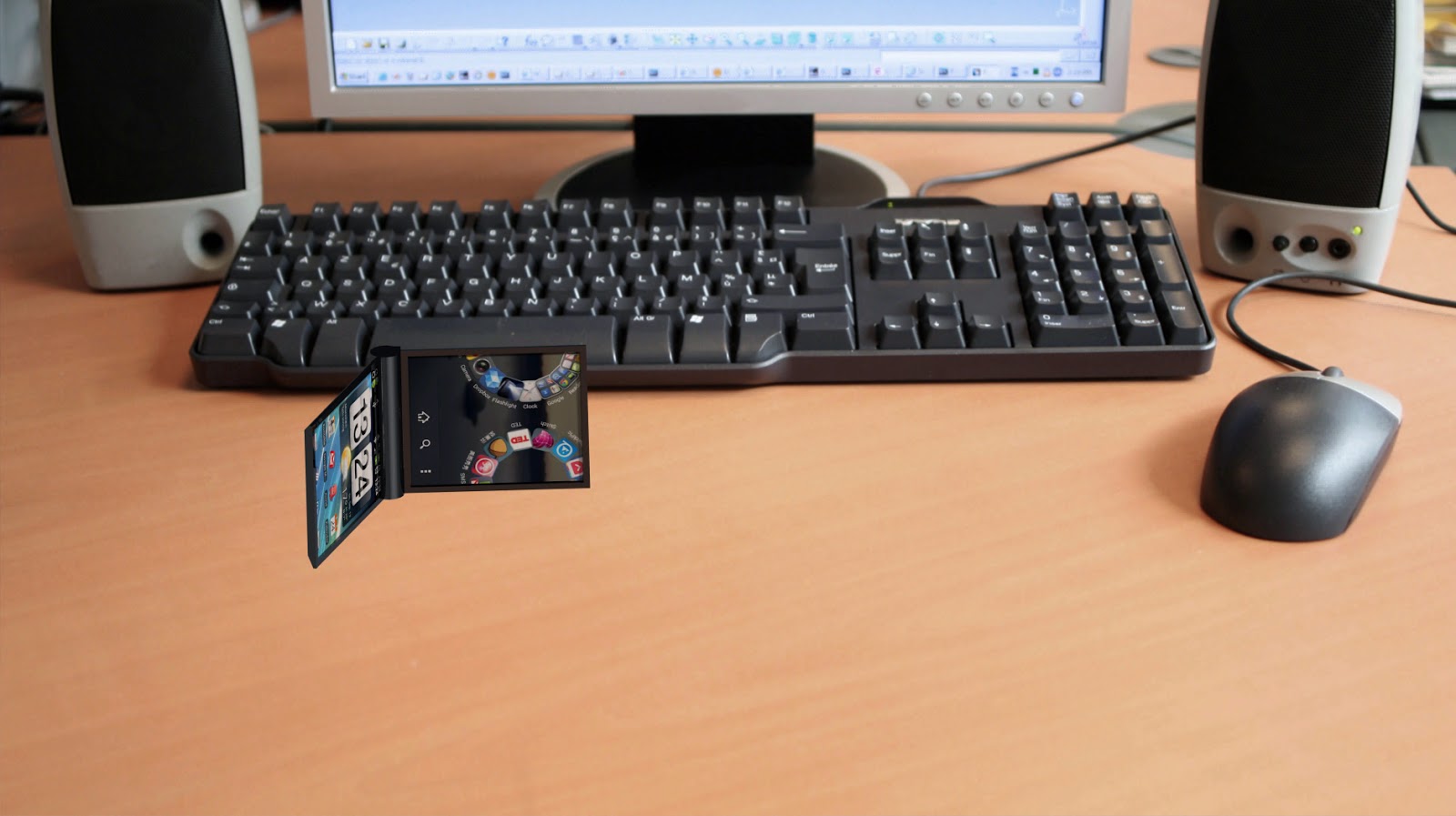


Set the SlantPhone up sideways to show feeds while your at your desk


The cylinder hinge adds battery, cooling, and ergonomic capabilities to the SlantPhone that a typical smartphone doesn't.


You don't need a case anymore because the phone can take care of itself.


To really use it as a table piece let it support itself.


I will be 3-D printing this model of the SlantPhone just to see what it would be like in the real world.

The SlantPhone would also be separable. So that you could take a call with one half and browse with the other as if it were two devices. Each display is 3x2.5 inches.


The SlantBook

Basically, a larger version of the SlantPhone. The SlantBook would not have a keyboard. Just two touch displays which allows for a completely dynamic user interface. After all a laptop is limited by its keyboard and mouse, a tablet loses half of its display to a keyboard, and a tablet with a keyboard is just an under-powered laptop. The SlantBook has none of the problems of those devices.